
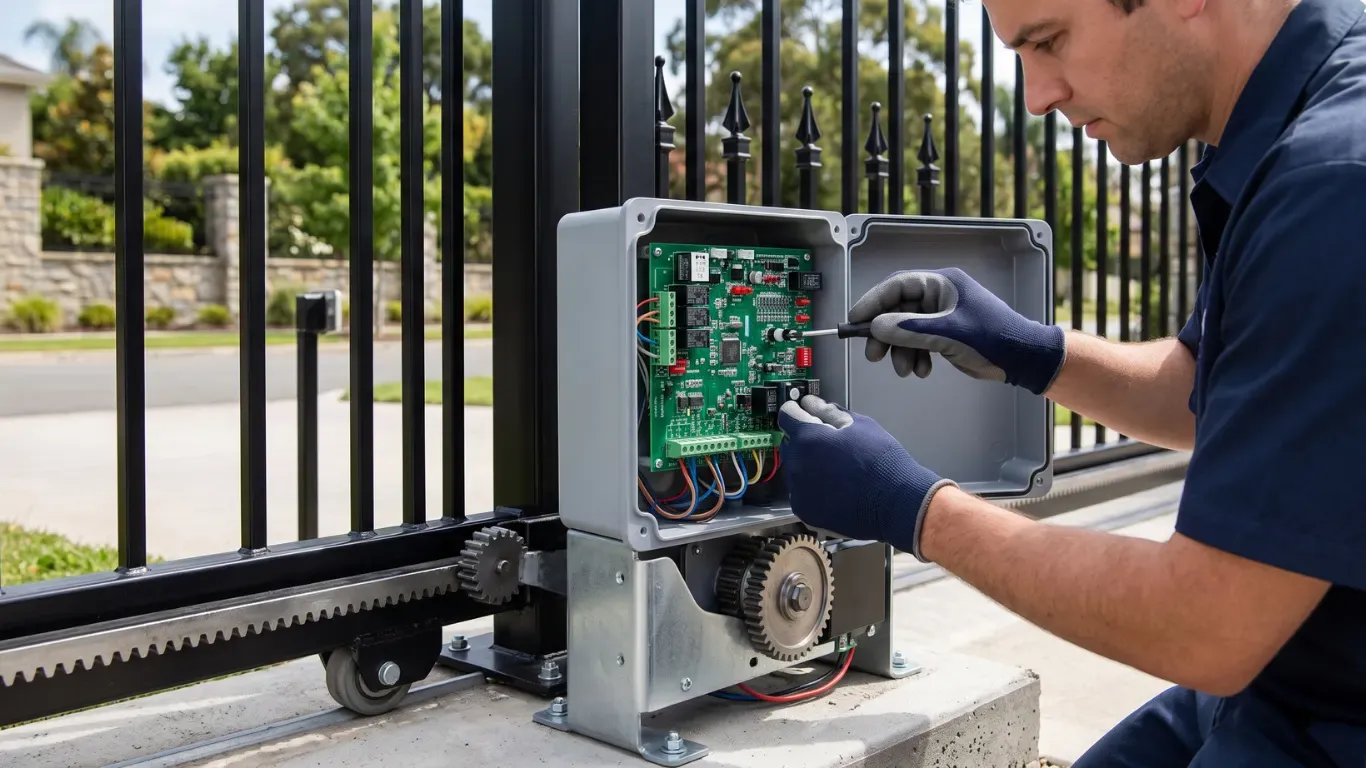
An automatic rolling gate opener does more than move a gate. It listens for a command and checks that the path is clear. It drives the gate at the right speed, slows it near the end, and stops at the same point every time. Then it decides whether to close again on its own.
Most buyers compare motor power and gate weight. Those matter. But the features that shape daily life at the gate sit in the control board. This article explains how that automation works and which features are worth paying attention to before you buy.
The Control Board
The control board is the brain of the opener. It takes signals in, makes decisions, and sends power to the motor. A typical board handles:
- Inputs: remotes, keypads, loop detectors, push buttons, and app commands
- Safety inputs: photocells and safety edges
- Position datlimit switches or an encoder that tracks where the gate is
- Outputs: motor power, warning light, and sometimes an electric lock
On a well-designed board, you can adjust most of the behavior through settings. The Open Bear sliding opener, for example, has 10 programmable controller settings. Each kit ships with an English parameter table, so installers know exactly what each setting changes.
How One Cycle Works
Here is what happens when you press the remote.
- The receiver picks up the signal and checks the code.
- The board confirms the safety inputs are clear.
- The motor starts slowly, then builds to full speed.
- The board watches motor current the whole time.
- As the gate nears its open limit, the motor slows down.
- The limit sensor triggers and the motor stops.
- If auto-close is on, a timer starts.
- When the timer ends, the board checks the photocells and closes the gate the same way.
Slow start and slow stop matter more than they sound. They reduce shock on the gear, rack, wheels, and gate frame. Over thousands of cycles, that means less wear and fewer adjustments. DC motors handle this speed control especially well, which is one reason many modern kits use a 24V DC motor.
Features That Change Daily Use
Auto-Close Timer
Auto-close shuts the gate after a set delay. Many owners end up relying on it, because nobody has to remember to close the gate. Set the delay long enough for a car to pass comfortably. The photocells stop the gate from closing on anything still in the opening.
Pedestrian or Partial Opening
This mode opens the gate only part of the way, enough for a person or bicycle. It saves time on long gates and keeps the full opening closed to vehicles.
Obstruction Sensing and Force Settings
The board compares motor current against a set level. If the gate meets unusual resistance, the opener stops or reverses. The sensitivity is adjustable. Set it too high and a stiff gate trips it constantly. Set it too low and the gate pushes too hard before reacting. An installer should set it with the gate in good mechanical condition.
Limit Switches
Limit switches tell the board where to stop. Magnetic limits use magnets fixed to the rack and a sensor in the opener. They don't wear like mechanical switches and they hold their position well. If a gate starts stopping in slightly different places, a loose limit magnet is often the cause.
Soft Start and Soft Stop
This is the ramped speed described above. Look for it on any electric rolling gate opener that will run many times a day. On heavy gates, it also reduces the jolt that loosens rack fixings over time.
Safety Automation
Automation brings convenience and risk together. A gate that closes on its own must be able to detect people and vehicles.
Most sites use at least two layers:
- Built-in sensing: the obstruction detection inside the opener
- External devices: photocells across the opening and safety edges on the gate
In the United States, UL 325 requires two independent entrapment protection means for each entrapment zone on an automatic gate. A sliding gate has zones in both directions of travel, so plan protection on both sides. Our guide to gate safety sensors covers the device types and where to mount them.
A flashing warning light is also good practice. It tells people nearby that the gate is about to move.
Ways to Trigger the Gate
An automatic gate opener can accept several inputs at the same time. Common choices include:
Trigger | Best for | Notes |
Handheld remote | Residents and staff | Quick and simple, needs pairing |
Keypad | Visitors, deliveries | Codes can be changed anytime |
Phone app (WiFi or Bluetooth) | Owners who want remote control | Useful for letting people in while away |
Loop detector | Free exit for vehicles | Senses metal in the driveway |
Intercom | Guest entry | Adds a voice check before opening |
For a deeper look at keypads, RFID, and vehicle loops, see our gate access control guide.
Smart and App Control
WiFi and Bluetooth control turn your phone into a remote. With WiFi, you can open the gate from anywhere with a signal, which helps when a delivery arrives while you're at work. Bluetooth works only close to the gate, but it doesn't depend on your home network. Some apps also show whether the gate is open or closed, which is useful if you forget to check on the way out.
Power and Backup
A gate that stops during a power cut is a real problem, especially if it traps a car inside. DC openers solve this well because they can run from a backup battery. The battery charges while mains power is on and takes over when it fails.
For remote sites with no mains supply, DC openers can also work with solar panels. Size the panel and battery for your daily cycles and the shortest winter days in your area.
Every opener also has a manual release. Show every regular user how it works, and keep the release key somewhere easy to find.
Common Automation Setup Mistakes
Many complaints about an automatic gate opener come from setup, not from faulty parts. These are the most common:
- Force set too high to hide drag. The gate runs, but safety sensing is weakened. Fix the drag instead.
- Auto-close enabled before photocells are fitted. This creates a real safety risk.
- Auto-close delay too short. Cars towing trailers and slow walkers end up relying on the photocells to stop the gate.
- Limit magnets set against the physical stops. The gate hits the stops every cycle, which shakes the automatic rolling gate motor and its mounts.
- No warning light. People near the gate get no signal before it moves.
Each of these takes minutes to correct and saves a lot of wear. A quick check of every setting after the first week of use is also worth doing, because gates settle and wheels bed in.
Adding an Electric Lock
The gear drive holds a sliding gate closed reasonably well. On high-security sites, some owners add an electric lock that the board releases just before each opening cycle. It adds a physical barrier against forcing the gate. Our article on electric gate locks explains when a lock is worth adding.
Choosing the Right Features for Your Property
The right setup depends on who uses the gate.
Family homes usually want auto-close, remotes, a keypad, photocells, and battery backup. A quiet electric rolling gate opener matters too, especially near bedrooms. Our residential gate opener solutions are built around those needs.
Shared entrances and businesses need everything above, plus logged access, loop detectors for free exit, and safety devices rated for heavier use.
Whichever group you fall into, make sure the automatic rolling gate motor suits the gate's weight and length. Features can't make up for an undersized motor.
Getting the Most From Your Opener
The best setup is the one that's matched to the gate and adjusted with care. Take time with the force settings, limit positions, and auto-close delay. Test every safety device before handing over the remotes. Then keep the gate rolling freely with regular service.
Open Bear openers run on 24V DC, stay under 60 dB, and ship with full English wiring diagrams and parameter tables. If you want help choosing settings or accessories for your site, our team is happy to talk it through.
FAQs
Q: Can I set my automatic rolling gate opener to close by itself?
Yes. Most openers have an auto-close timer you can switch on and adjust in the settings. Always install working photocells before you enable auto-close, so the gate can't close on a person, pet, or vehicle in the opening.
Q: Why does my gate stop in a different place each time?
Inconsistent stopping usually points to a loose limit magnet, a gap in the rack joints, or a gear that slips under load. Check the magnet brackets first, then confirm the rack is fixed firmly along its whole length.
Q: Can one opener work with several remotes and a keypad?
Yes. Most receivers store many remote codes, and keypads connect to the same trigger input. You can run remotes, a keypad, and an app together, as long as each device uses a format the board supports.
Q: What happens if the power fails while the gate is moving?
Without backup, the gate stops where it is. With battery backup, a DC opener carries on and finishes the cycle. You can always use the manual release to free the drive and move the gate by hand.
Q: Is an automatic gate safe around children and pets?
It can be, with the right setup. Use photocells and safety edges, keep obstruction sensing correctly adjusted, and test them regularly. Teach children not to play near the gate, and never let anyone ride on it.

Frequently Asked Questions
Key engineering and selection answers regarding this topic
Yes. Most openers have an auto-close timer you can switch on and adjust in the settings. Always install working photocells before you enable auto-close, so the gate can't close on a person, pet, or vehicle in the opening.
Inconsistent stopping usually points to a loose limit magnet, a gap in the rack joints, or a gear that slips under load. Check the magnet brackets first, then confirm the rack is fixed firmly along its whole length.
Yes. Most receivers store many remote codes, and keypads connect to the same trigger input. You can run remotes, a keypad, and an app together, as long as each device uses a format the board supports.
Without backup, the gate stops where it is. With battery backup, a DC opener carries on and finishes the cycle. You can always use the manual release to free the drive and move the gate by hand.
It can be, with the right setup. Use photocells and safety edges, keep obstruction sensing correctly adjusted, and test them regularly. Teach children not to play near the gate, and never let anyone ride on it.
Explore Related Automation Systems
Looking for motors, hardware, or installation systems mentioned in this guide? Discover our factory-direct gate opener range:
All Gate Openers
Browse DC24V sliding, swing & barrier operators with full factory warranty.
Explore Products →Residential Gate Operators
Ultra-quiet, solar-ready sliding & swing gate motors for homes and villas.
Residential Solutions →Commercial Gate Systems
Continuous-duty operators for gated communities, business parks & parking.
Commercial Solutions →Industrial Heavy-Duty
High-torque motors engineered for gates up to 4,000 kg and logistics hubs.
Industrial Solutions →